Atlas
The Atlas component is used for efficient rendering of multiple instances of the same texture or image. It is especially useful for drawing a very large number of similar objects, like sprites or tiles, with varying transformations.
Atlas transforms can be animated with near-zero cost using worklets. This makes it ideal for tile-based maps, sprite animations, and any scenario where you have many instances of similar textures. Its design is particularly useful when combined with Reanimated.
| Name | Type | Description |
|---|---|---|
| image | SkImage or null | Atlas: image containing the sprites. |
| sprites | SkRect[] | locations of sprites in atlas. |
| transforms | RSXform[] | Rotation/scale transforms to be applied for each sprite. |
| colors? | SkColor[] | Optional. Color to blend the sprites with. |
| colorBlendMode? | BlendMode | Optional. Blend mode used to combine sprite colors with the texture. Default is dstOver. |
| blendMode? | BlendMode | Optional. Blend mode used for layer compositing (how the Atlas is drawn onto the canvas). |
| sampling? | Sampling | The method used to sample the image. see (sampling options). |
In v3, Skia Graphite draws an atlas one sprite at a time. Very large atlases run slower than they did in v2. See Performance below.
RSXform
The RSXform object used by the altas API is the compression of the following matrix: [fSCos -fSSin fTx, fSSin fSCos fTy, 0, 0, 1]. Below are few transformations that you will find useful:
import {Skia} from "react-native-skia";

// 1. Identity (doesn't do anything)
let rsxForm = Skia.RSXform(1, 0, 0, 0);

// 2. Scale by 2 and translate by (50, 100)
rsxForm = Skia.RSXform(2, 0, 50, 100);

// 3. Rotate by PI/4, default pivot point is (0,0), translate by (50, 100)
const r = Math.PI/4;
rsxForm = Skia.RSXform(Math.cos(r), Math.sin(r), 50, 100);

// 4. Scale by 2, rotate by PI/4 with pivot point (25, 25)
rsxForm = Skia.RSXformFromRadians(2, r, 0, 0, 25, 25);

// 5. translate by (125, 0), rotate by PI/4 with pivot point (125, 25)
rsxForm = Skia.RSXformFromRadians(1, r, 100, 0, 125, 25);
Hello World
In the example below, we draw in simple rectangle as an image. Then we display that rectangle 150 times with a simple transformation applied to each rectangle.
import {Skia, drawAsImage, Group, Rect, Canvas, Atlas, rect} from "react-native-skia";

const size = { width: 25, height: 11.25 };
const strokeWidth = 2;
const imageSize = {
    width: size.width + strokeWidth,
    height: size.height + strokeWidth,
};
const image = await drawAsImage(
    <Group>
    <Rect
        rect={rect(strokeWidth / 2, strokeWidth / 2, size.width, size.height)}
        color="cyan"
    />
    <Rect
        rect={rect(strokeWidth / 2, strokeWidth / 2, size.width, size.height)}
        color="blue"
        style="stroke"
        strokeWidth={strokeWidth}
    />
    </Group>,
    imageSize
);

export const Demo = () => {
  const numberOfBoxes = 150;
  const pos = { x: 128, y: 128 };
  const width = 256;
  const sprites = new Array(numberOfBoxes)
    .fill(0)
    .map(() => rect(0, 0, imageSize.width, imageSize.height));
  const transforms = new Array(numberOfBoxes).fill(0).map((_, i) => {
    const tx = 5 + ((i * size.width) % width);
    const ty = 25 + Math.floor(i / (width / size.width)) * size.width;
    const r = Math.atan2(pos.y - ty, pos.x - tx);
    return Skia.RSXform(Math.cos(r), Math.sin(r), tx, ty);
  });

  return (
    <Canvas style={{ flex: 1 }}>
      <Atlas image={image} sprites={sprites} transforms={transforms} />
    </Canvas>
  );
};
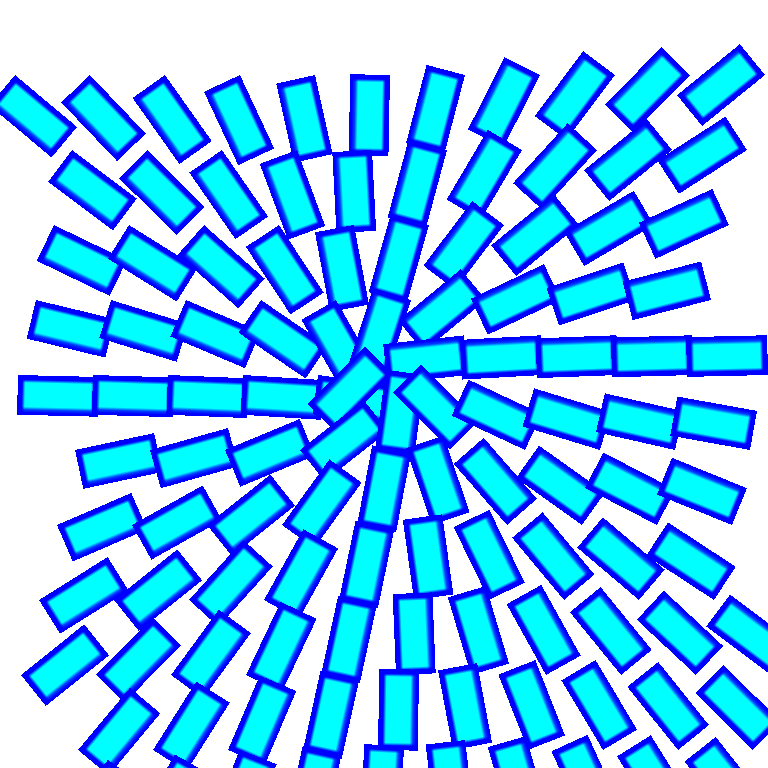
Animations
The Atlas component should usually be used with Reanimated.
First, the useTexture hook will enable you to create a texture off the JS thread without needing to make any copies.
Secondly, we provide you with hooks such as useRectBuffer and useRSXformBuffer to efficiently animates on the sprites and transformations.
The example below is identical to the one above but the position is an animation value bound to a gesture.
import {Skia, drawAsImage, Group, Rect, Canvas, Atlas, rect, useTexture, useRSXformBuffer} from "react-native-skia";
import {useSharedValue, useDerivedValue} from "react-native-reanimated";
import {GestureDetector, Gesture} from "react-native-gesture-handler";

const size = { width: 25, height: 11.25 };
const strokeWidth = 2;
const textureSize = {
    width: size.width + strokeWidth,
    height: size.height + strokeWidth,
};

export const Demo = () => {
  const pos = useSharedValue({ x: 0, y: 0 });
  const texture = useTexture(
    <Group>
      <Rect
        rect={rect(strokeWidth / 2, strokeWidth / 2, size.width, size.height)}
        color="cyan"
      />
      <Rect
        rect={rect(strokeWidth / 2, strokeWidth / 2, size.width, size.height)}
        color="blue"
        style="stroke"
        strokeWidth={strokeWidth}
      />
    </Group>,
    textureSize
  );
  const gesture = Gesture.Pan().onChange((e) => (pos.value = e));
  const numberOfBoxes = 150;
  const width = 256;
  const sprites = new Array(numberOfBoxes)
    .fill(0)
    .map(() => rect(0, 0, textureSize.width, textureSize.height));

  const transforms = useRSXformBuffer(numberOfBoxes, (val, i) => {
    "worklet";
    const tx = 5 + ((i * size.width) % width);
    const ty = 25 + Math.floor(i / (width / size.width)) * size.width;
    const r = Math.atan2(pos.value.y - ty, pos.value.x - tx);
    val.set(Math.cos(r), Math.sin(r), tx, ty);
  });

  return (
    <GestureDetector gesture={gesture}>
      <Canvas style={{ flex: 1 }}>
        <Atlas image={texture} sprites={sprites} transforms={transforms} />
      </Canvas>
    </GestureDetector>
  );
};
Performance
In v2, Skia drew the whole atlas as a single GPU operation: the Ganesh backend packed every sprite into one vertex buffer and submitted it as one draw (DrawAtlasOp).
In v3, React Native Skia renders with Graphite, and Graphite does not have a dedicated atlas renderer yet.
Its drawAtlas implementation (src/gpu/graphite/Device.cpp in Skia) loops over the sprites and records one rectangle draw per sprite, each with its own transform and, when colors are provided, its own paint parameters.
Graphite can still merge consecutive sprites that share the same pipeline into one instanced GPU draw, but the recording cost on the render thread grows with the number of sprites.
On the Skia side, the cost is close to drawing each sprite individually. The Atlas component still saves you one React component and one recorded command per sprite, but it is no longer a single GPU operation.
What this changes for you:
- Animating the transforms with
useRSXformBufferremains cheap on the JS and UI threads: the buffers are updated in place and nothing is re-recorded there. - With a few hundred sprites, the difference is usually not noticeable.
- With tens of thousands of sprites, expect lower frame rates than in v2. Pass
colorsonly when you need them, since each per-sprite color adds its own paint parameters to record.
This is a limitation of Skia Graphite rather than of React Native Skia. The Atlas component will get faster when Skia ships a batched atlas renderer for Graphite.
Drawing sprites with WebGPU
If you need to draw a very large number of sprites, React Native WebGPU is an alternative. Because Skia and WebGPU share the same GPU device in v3, you can draw the sprites with an instanced WebGPU render pipeline and compose the result in a Skia canvas without any copy:
- Export the atlas image as a WebGPU texture with
Skia.Image.MakeGPUTextureFromImage()(see exporting an image). - Store the per-sprite data (transform, source rectangle, color) in a vertex buffer with a per-instance step mode and draw all sprites with a single
drawIndexed(6, spriteCount)call, sampling the atlas texture in the fragment shader. - Render into a texture created with the
TEXTURE_BINDINGusage, wrap it withSkia.Image.MakeImageFromGPUTexture(), and draw it with theImagecomponent (see from WebGPU to Skia).
This is what Ganesh did internally in v2, and it scales to a very large number of sprites.
It is only available on native platforms; on the Web, Skia runs on WebGL through CanvasKit, where drawAtlas is batched as it was in v2.